

As a BoloUp agent, the bulk of your commission comes directly from the hosts on your team, which makes recruitment one of the smartest investments of your time on the platform. The more skilled and consistently active hosts you bring in, the more your earnings grow alongside them. The good news is that the host invitation on BoloUp is simple and easy to follow from start to finish.
Host Invitation Steps as BoloUp Agent
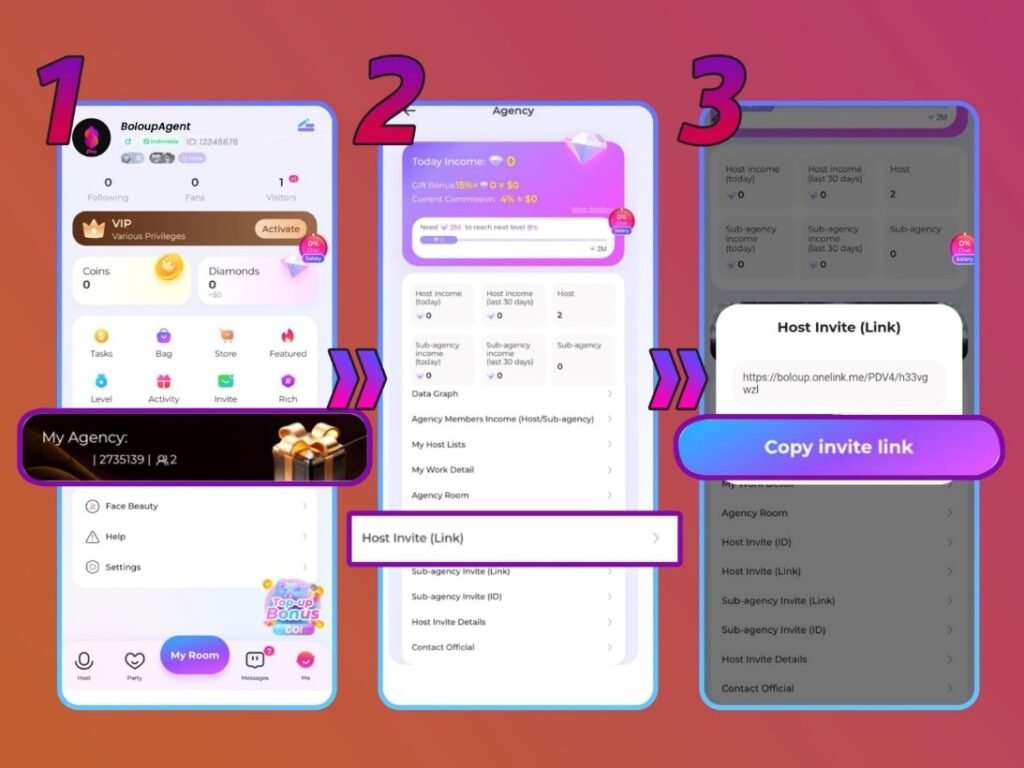
Step 1: Go to Your Profile Page and Tap the ‘My Agency’ Button
Open the BoloUp Live app and head to your profile page. Once there, locate and tap the ‘My Agency’ button to enter your agent dashboard, where all host management and invitation tools are available.
Step 2: Click on the ‘Host Invite Link’ Menu
Inside the ‘My Agency’ section, find and tap the ‘Host Invite (Link)’ menu. This is where you’ll generate the invitation link that you’ll be sharing with potential hosts.
Step 3: Copy the Host Invitation Link
Once inside the menu, copy the invitation link provided. You can then share this link directly with any host you’d like to invite — through social media, messaging apps, or any other platform you use to connect with potential recruits.
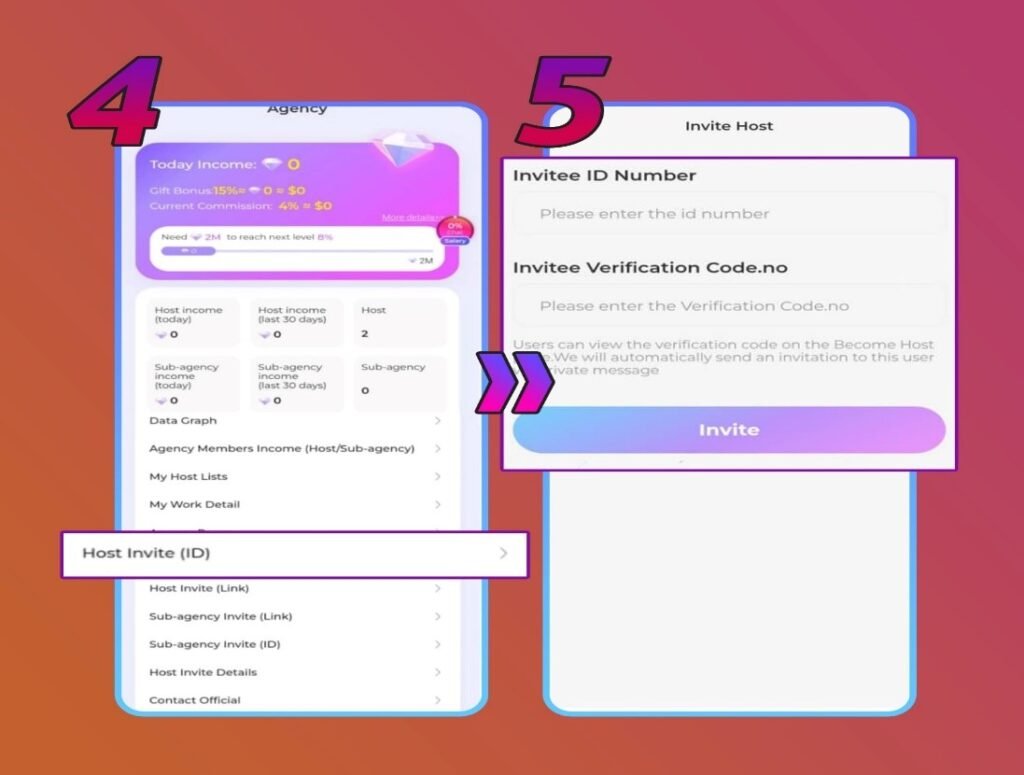
Step 4: Alternative Method: Use the ‘Host Invite (ID)’ Menu
Prefer a more direct approach? Inside your agency menu, tap the ‘Host Invite (ID)’ option instead. This method allows you to invite a specific host directly using their account credentials rather than sharing a general link.
Step 5: Enter the Host’s ID and Verification Code
With the ‘Host Invite (ID)’ method, you’ll need to fill in the host’s unique ID along with their verification code. Make sure both details are obtained directly from the host and entered accurately before submitting, any error could prevent the invitation from going through successfully.
Host Invitation Common Problems & Solutions
- I invited a host but they weren’t able to join my agency
There are usually two reasons this occurs, either the Host ID was entered with an error, or the host is already a member of a different agency. Get in touch with the host to verify their details and try sending the invitation again once everything checks out.
- I want to recruit a host who’s currently in another agency
This isn’t something that can happen right away. You’ll need to hold off until the host has officially and formally left their current agency before you can extend an invitation for them to join yours.
BoloUp Host Invitation Frequently Asked Questions
- Can a host I invited start earning for me right away?
Yes, as long as they have completed both their face verification and ID verification process, they can begin contributing to your earnings immediately after joining.
- Are there performance requirements I need to meet as an agent?
Yes, BoloUp holds agents to activity-based standards covering both recruitment amount and overall team activity. If your entire roster of hosts and sub-agents goes inactive for a full month, your agency risks being closed and your members reassigned to the platform’s official agency. These requirements are subject to change, so it’s always best to check in with our team directly for the most up-to-date information.
- What if I don’t have the host’s ID or verification code?
The Host ID and verification code are only required if you’re using the alternative invitation method. If you’re going that route, reach out to the host directly and ask them to share their details before attempting to send the invite.
Every Host You Recruit Brings You One Step Closer to Your Goals
That wraps up everything you need to know about inviting hosts to your BoloUp agency. Always remember that your progress as an agent, both the growth of your community and the strength of your income, comes down to how many active, engaged hosts you have on your team.
Have questions about the invitation process or anything else that comes with being a BoloUp agent? Our team is always here and ready to help, reach out anytime. Don’t forget to visit our blog as well for more in-depth guides, practical tips, and resources to support you throughout your journey on BoloUp.
